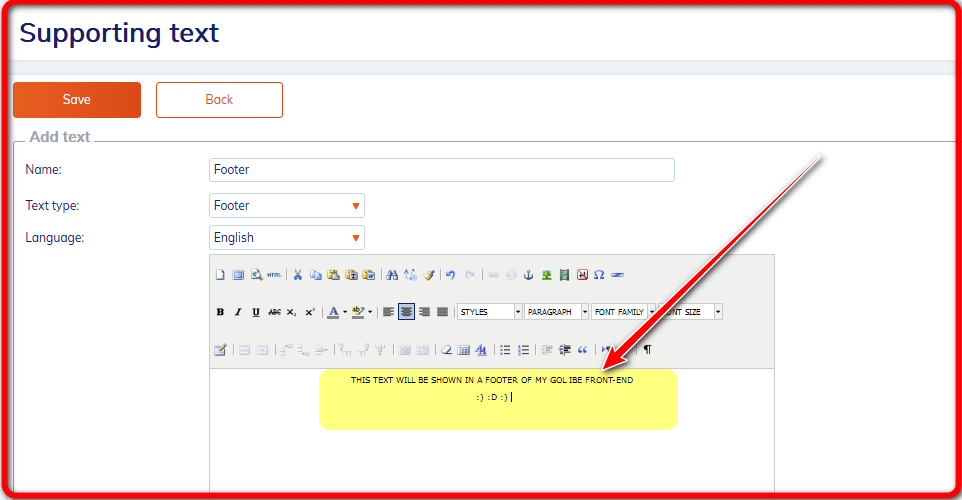
# How to create footer on your frontend?

1\) Log into admin console.

2\) Go to the section **Supporting texts - Supporting texts**.

3\) Click at button **"Add text"**.

4\) Start with footer creation.

a) **Name** - we recommed to call this type Footer. This way you will recognize it easily in the list of supporting texts.

b) **Text type** - find Footer.

c) **Language** - choose that one your frontend is in.

d) **Body of footer** - insert whatever text you would like to have in your footer.

&#x20;

* admin console view

<figure><img src="https://974712556-files.gitbook.io/~/files/v0/b/gitbook-x-prod.appspot.com/o/spaces%2F-LPjLiK_ydn4NIc66tQx%2Fuploads%2F9PTFRRnWXKUN9Qt4G9ZR%2Fimage.png?alt=media&#x26;token=8d5b0b28-a54a-4b2e-9199-e67a3d34a4e4" alt=""><figcaption></figcaption></figure>

* frontend&#x20;

<figure><img src="https://974712556-files.gitbook.io/~/files/v0/b/gitbook-x-prod.appspot.com/o/spaces%2F-LPjLiK_ydn4NIc66tQx%2Fuploads%2FtPSYzznPUNHDiQiAEFcL%2Fimage.png?alt=media&#x26;token=f0ff7114-7a12-4c9c-85e3-bdc58cff1777" alt=""><figcaption></figcaption></figure>