# What is section Destination filters good for?

Destination filter is the section where you can modify what destination you would like to hide or what destination you would like to have in the offer.

This update must be done from agency´s side only.&#x20;

1\. Log into admin console.

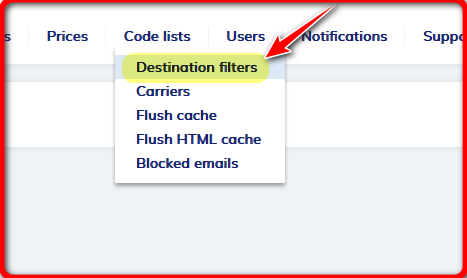
2.Find section **Code list** - **Destination filters**.

<figure><img src="https://974712556-files.gitbook.io/~/files/v0/b/gitbook-x-prod.appspot.com/o/spaces%2F-LPjLiK_ydn4NIc66tQx%2Fuploads%2Fa6rwN96dj0bTrtD2UtAJ%2Fimage.png?alt=media&#x26;token=134ef8b9-cdb8-49ce-9573-2ca396f670f0" alt=""><figcaption></figcaption></figure>

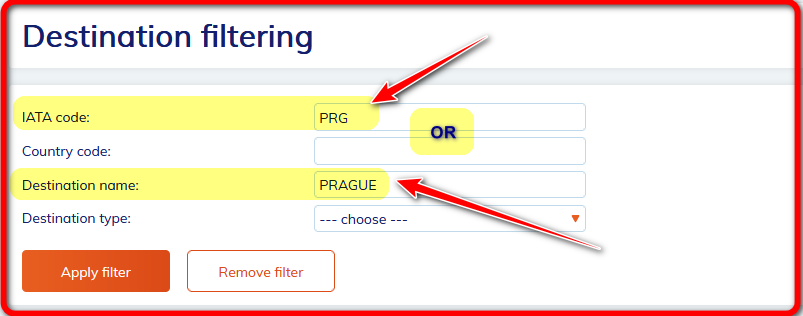
3.Find requested destination.&#x20;

You may find it by inserting IATA code or simply by inserting the whole name in English.&#x20;

Click at button **"Apply filter"** to confirm your search.

&#x20;

<figure><img src="https://974712556-files.gitbook.io/~/files/v0/b/gitbook-x-prod.appspot.com/o/spaces%2F-LPjLiK_ydn4NIc66tQx%2Fuploads%2FddzmDk9dUb45CmC68Qxe%2Fimage.png?alt=media&#x26;token=2769f0fc-cae2-4072-8d50-fcf7208e41bc" alt=""><figcaption></figcaption></figure>

**a) to uncover the destination**

* If it says **REMOVE FILTER** it means that it is hidden.&#x20;
* To uncover requested destionation just click at expression REMOVE FILTER and filter will be removed = destination will be avialable on your frontend.

<figure><img src="https://974712556-files.gitbook.io/~/files/v0/b/gitbook-x-prod.appspot.com/o/spaces%2F-LPjLiK_ydn4NIc66tQx%2Fuploads%2Fyyf4aLK6a7T8z2DWr9xG%2Fimage.png?alt=media&#x26;token=ed1013d4-2f3f-4081-8769-d4464d736da8" alt=""><figcaption></figcaption></figure>

**b) to hide destination**

* If it says **FILTER** it means that now that exact city is available on your frontend.&#x20;
* So, if you would like to **HIDE** it  just click at the word **FILTER** and it will be hidden.

<figure><img src="https://974712556-files.gitbook.io/~/files/v0/b/gitbook-x-prod.appspot.com/o/spaces%2F-LPjLiK_ydn4NIc66tQx%2Fuploads%2F47JitN3oiwKrufQJJYM6%2Fimage.png?alt=media&#x26;token=25d836f8-40c2-41d9-9da3-513a11b71fce" alt=""><figcaption></figcaption></figure>

It is so easy!&#x20;

In case you do not have this section enabled in admin console just feel free to contact us at: <helpdesk@cee-systems.com>